
ArgTypes
ArgTypes 指定了 args 的行为。通过指定 arg 的类型,您可以限制它可以接受的值,并提供有关未显式设置的 arg 的信息(即 description)。
您还可以使用 argTypes 来“注解” arg,以提供给利用这些 arg 的插件的信息。例如,要指示 controls 面板渲染颜色选择器,您可以指定 'color' control 类型。
ArgTypes 最具体的实现是 ArgTypes 文档块(Controls 类似)。表中的每一行对应一个 argType 和该 arg 的当前值。
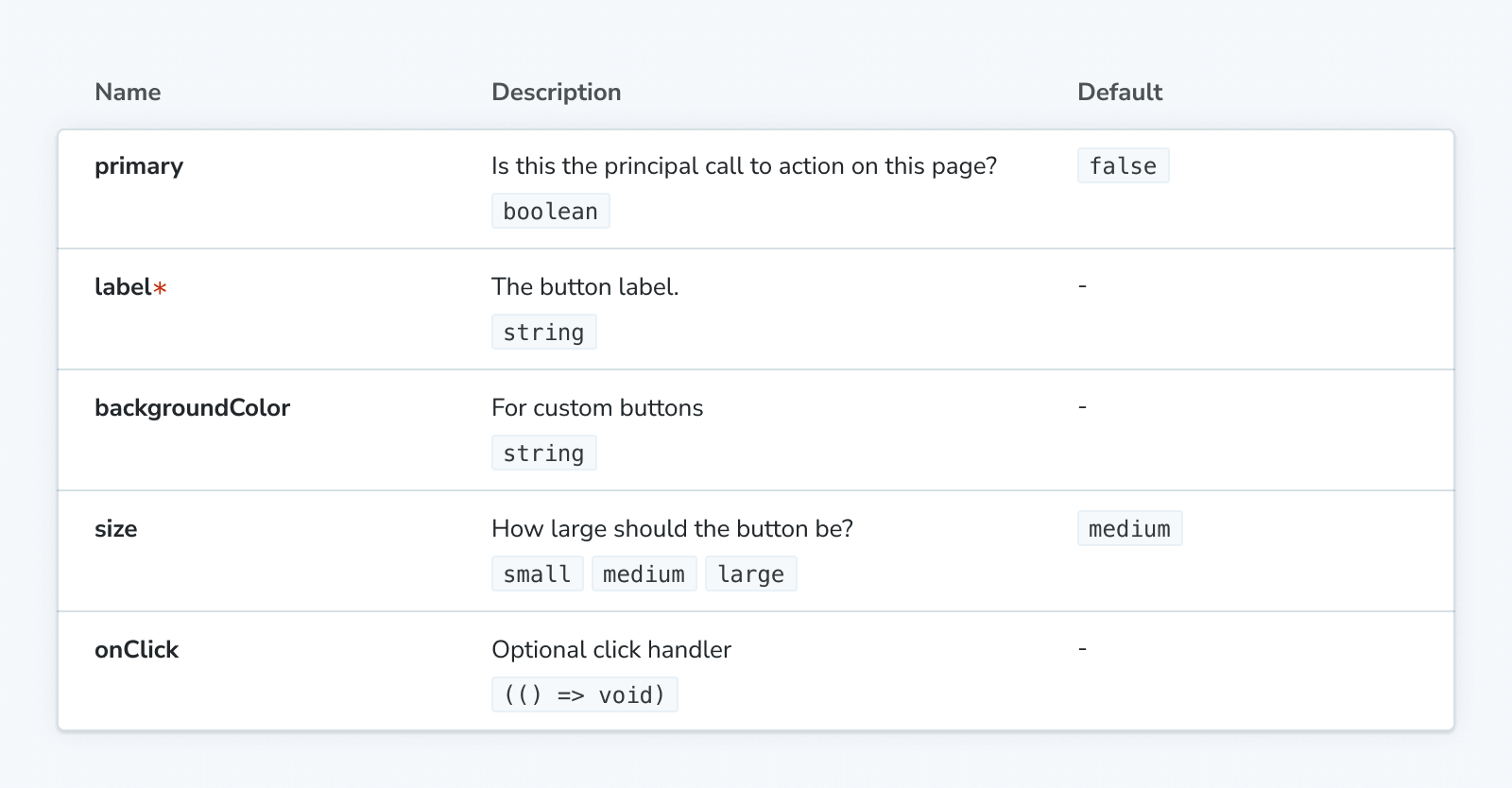
自动推断 ArgType
如果您使用的是 Storybook docs 插件,那么 Storybook 将根据 CSF 文件 默认导出中指定的 component 为每个 story 推断一组 argTypes。
为此,Storybook 会根据您的框架使用各种静态分析工具。
| 框架 | 静态分析工具 |
|---|---|
| React | react-docgen (默认) 或 react-docgen-typescript |
| Vue | vue-docgen-api |
| Angular | compodoc |
| WebComponents | custom-element.json |
| Ember | YUI doc |
argTypes 的数据结构旨在匹配这些工具的输出。手动指定的属性将覆盖推断出的属性。
手动指定 ArgTypes
对于大多数 Storybook 项目,argTypes 会从您的组件中自动推断。任何手动指定的 argTypes 都将覆盖推断出的值。
默认导出的 CSF 文件中的 argTypes 最常在 meta (组件) 级别指定
// Replace your-framework with the framework you are using, e.g. react-vite, nextjs, vue3-vite, etc.
import type { Meta } from '@storybook/your-framework';

import { Button } from './Button';

const meta = {
  component: Button,
  argTypes: {
    // 👇 All Button stories expect a label arg
    label: {
      control: 'text',
      description: 'Overwritten description',
    },
  },
} satisfies Meta<typeof Button>;

export default meta;
在 preview.js|ts 配置文件的项目(全局)级别指定它们可以应用于所有 stories
// Replace your-framework with the framework you are using, e.g. react-vite, nextjs, vue3-vite, etc.
import type { Preview } from '@storybook/your-framework';

const preview = {
  argTypes: {
    // 👇 All stories expect a label arg
    label: {
      control: 'text',
      description: 'Overwritten description',
    },
  },
} satisfies Preview;

export default preview;或者它们可以仅应用于特定的 story
// Replace your-framework with the framework you are using, e.g. react-vite, nextjs, vue3-vite, etc.
import type { Meta, StoryObj } from '@storybook/your-framework';

import { Button } from './Button';

const meta = {
  component: Button,
} satisfies Meta<typeof Button>;

export default meta;
type Story = StoryObj<typeof meta>;

export const Basic: Story = {
  argTypes: {
    // 👇 This story expects a label arg
    label: {
      control: 'text',
      description: 'Overwritten description',
    },
  },
} satisfies Story;
argTypes
类型
{
  [key: string]: {
    control?: ControlType | { type: ControlType; /* See below for more */ } | false;
    description?: string;
    if?: Conditional;
    mapping?: { [key: string]: { [option: string]: any } };
    name?: string;
    options?: string[];
    table?: {
      category?: string;
      defaultValue?: { summary: string; detail?: string };
      disable?: boolean;
      subcategory?: string;
      type?: { summary?: string; detail?: string };
    },
    type?: SBType | SBScalarType['name'];
  }
}
您可以使用一个对象来配置 argTypes,对象的键匹配 args 的名称。每个键的值是一个对象,其中包含以下属性:
control
类型
| ControlType
| {
    type: ControlType,
    accept?: string;
    labels?: { [option: string]: string };
    max?: number;
    min?: number;
    presetColors?: string[];
    step?: number;
  }
| false
Default
指定 arg 的 controls 面板的行为。如果指定字符串,则用作 control 的 type。如果指定对象,则可以提供其他配置。指定 false 将阻止 control 渲染。
// Replace your-framework with the framework you are using, e.g. react-vite, nextjs, vue3-vite, etc.
import type { Meta } from '@storybook/your-framework';

import { Example } from './Example';

const meta = {
  component: Example,
  argTypes: {
    value: {
      control: {
        type: 'number',
        min: 0,
        max: 100,
        step: 10,
      },
    },
  },
} satisfies Meta<typeof Example>;

export default meta;
control.type
类型: ControlType | null
默认: 推断; 'select',如果指定了 options;回退到 'object'
指定用于在 controls 面板 中更改 arg 值时使用的 control 类型。以下是可用的类型 ControlType,按它们处理的数据类型分组:
| 数据类型 | ControlType | 描述 |
|---|---|---|
| array | 'object' | 提供一个基于 JSON 的编辑器来处理数组的值。还允许以原始模式进行编辑。{ control: 'object' } |
| boolean | 'boolean' | 提供一个切换器来在可能的状态之间切换。{ control: 'boolean' } |
| enum | 'check' | 提供一组堆叠的复选框来选择多个选项。{ control: 'check', options: ['email', 'phone', 'mail'] } |
'inline-check' | 提供一组内联复选框来选择多个选项。{ control: 'inline-check', options: ['email', 'phone', 'mail'] } | |
'radio' | 根据可用选项提供一组堆叠的单选按钮。{ control: 'radio', options: ['email', 'phone', 'mail'] } | |
'inline-radio' | 根据可用选项提供一组内联单选按钮。{ control: 'inline-radio', options: ['email', 'phone', 'mail'] } | |
'select' | 提供一个 select 来从选项中选择单个值。{ control: 'select', options: [20, 30, 40, 50] } | |
'multi-select' | 提供一个 select 来选择多个选项。{ control: 'multi-select', options: ['USA', 'Canada', 'Mexico'] } | |
| number | 'number' | 提供一个数字输入来包含所有可能值的范围。{ control: { type: 'number', min:1, max:30, step: 2 } } |
'range' | 提供一个范围滑块来包含所有可能的值。{ control: { type: 'range', min: 1, max: 30, step: 3 } } | |
| object | 'file' | 提供一个文件输入,它返回一个 URL 数组。可以进一步自定义以接受特定文件类型。{ control: { type: 'file', accept: '.png' } } |
'object' | 提供一个基于 JSON 的编辑器来处理对象的值。还允许以原始模式进行编辑。{ control: 'object' } | |
| string | 'color' | 提供一个颜色选择器来选择颜色值。可以额外配置以包含一组颜色预设。{ control: { type: 'color', presetColors: ['red', 'green']} } |
'date' | 提供一个日期选择器来选择日期。{ control: 'date' } | |
'text' | 提供一个自由文本输入。{ control: 'text' } |
date control 会在值更改时将日期转换为 UNIX 时间戳。这是一个已知限制,将在未来的版本中修复。如果您需要表示实际日期,您需要更新 story 的实现并将值转换为 date 对象。
control.accept
类型:string
当 type 是 'file' 时,您可以指定接受的文件类型。值应该是逗号分隔的 MIME 类型字符串。
control.labels
类型: { [option: string]: string }
将 options 映射到标签。 labels 不必是详尽的。如果某个选项不在对象的键中,则按原样使用。
control.max
类型:number
当 type 是 'number' 或 'range' 时,设置允许的最大值。
control.min
类型:number
当 type 是 'number' 或 'range' 时,设置允许的最小值。
control.presetColors
类型: string[]
当 type 是 'color' 时,定义除了通用颜色选择器之外可用的颜色集合。数组中的值应该是有效的 CSS 颜色值。
control.step
类型:number
当 type 是 'number' 或 'range' 时,设置增/减值时允许的粒度。
description
类型:string
默认: 推断
描述 arg。(如果您打算描述 arg 的类型,则应使用 table.type,而不是。
// Replace your-framework with the framework you are using, e.g. react-vite, nextjs, vue3-vite, etc.
import type { Meta } from '@storybook/your-framework';

import { Example } from './Example';

const meta = {
  component: Example,
  argTypes: {
    value: {
      description: 'The value of the slider',
    },
  },
} satisfies Meta<typeof Example>;

export default meta;
if
类型
{
  [predicateType: 'arg' | 'global']: string;
  eq?: any;
  exists?: boolean;
  neq?: any;
  truthy?: boolean;
}
根据另一个 arg 或 global 的值有条件地渲染 argType。
// Replace your-framework with the framework you are using, e.g. react-vite, nextjs, vue3-vite, etc.
import type { Meta } from '@storybook/your-framework';

import { Example } from './Example';

const meta = {
  component: Example,
  argTypes: {
    parent: { control: 'select', options: ['one', 'two', 'three'] },

    // 👇 Only shown when `parent` arg exists
    parentExists: { if: { arg: 'parent', exists: true } },

    // 👇 Only shown when `parent` arg does not exist
    parentDoesNotExist: { if: { arg: 'parent', exists: false } },

    // 👇 Only shown when `parent` arg value is truthy
    parentIsTruthy: { if: { arg: 'parent' } },
    parentIsTruthyVerbose: { if: { arg: 'parent', truthy: true } },

    // 👇 Only shown when `parent` arg value is not truthy
    parentIsNotTruthy: { if: { arg: 'parent', truthy: false } },

    // 👇 Only shown when `parent` arg value is 'three'
    parentIsEqToValue: { if: { arg: 'parent', eq: 'three' } },

    // 👇 Only shown when `parent` arg value is not 'three'
    parentIsNotEqToValue: { if: { arg: 'parent', neq: 'three' } },

    // Each of the above can also be conditional on the value of a globalType, e.g.:

    // 👇 Only shown when `theme` global exists
    parentExists: { if: { global: 'theme', exists: true } },
  },
} satisfies Meta<typeof Example>;

export default meta;
mapping
类型: { [key: string]: { [option: string]: any } }
将 options 映射到值。
当处理非原始值时,您会发现会遇到一些限制。最明显的问题是并非所有值都可以表示为 URL 中 args 参数的一部分,从而失去了共享此类状态和深层链接的能力。除此之外,像 JSX 这样的复杂值无法在管理器(例如 Controls 面板)和预览(您的 story)之间同步。
mapping 不必是详尽的。如果当前选定的选项未列出,则按原样使用。可以与 control.labels 一起使用。
// Replace your-framework with the framework you are using, e.g. react-vite, nextjs, vue3-vite, etc.
import type { Meta } from '@storybook/your-framework';

import { Example } from './Example';

const meta = {
  component: Example,
  argTypes: {
    label: {
      control: { type: 'select' },
      options: ['Normal', 'Bold', 'Italic'],
      mapping: {
        Bold: <b>Bold</b>,
        Italic: <i>Italic</i>,
      },
    },
  },
} satisfies Meta<typeof Example>;

export default meta;
name
类型:string
argTypes 对象使用 arg 的名称作为键。默认情况下,在 Storybook 中显示 argType 时会使用该键。您可以通过指定 name 属性来覆盖显示的名称。
// Replace your-framework with the framework you are using, e.g. react-vite, nextjs, vue3-vite, etc.
import type { Meta } from '@storybook/your-framework';

import { Example } from './Example';

const meta = {
  component: Example,
  argTypes: {
    actualArgName: {
      name: 'Friendly name',
    },
  },
} satisfies Meta<typeof Example>;

export default meta;请谨慎以这种方式重命名 args。您的组件的用户将无法使用文档化的名称作为您组件的属性,并且实际名称不会显示。
因此,name 属性最适合用于定义仅用于文档目的的 argType,而不是组件的实际属性。例如,在为对象的每个属性提供 argTypes时。
options
类型: string[]
默认: 推断
如果 arg 接受有限数量的值,您可以使用 options 指定它们。如果这些值是复杂的,例如 JSX 元素,您可以使用 mapping 将它们映射到字符串值。您可以使用 control.labels 为选项提供自定义标签。
// Replace your-framework with the framework you are using, e.g. react-vite, nextjs, vue3-vite, etc.
import type { Meta } from '@storybook/your-framework';

import { Example } from './Example';

const meta = {
  component: Example,
  argTypes: {
    icon: {
      options: ['arrow-up', 'arrow-down', 'loading'],
    },
  },
} satisfies Meta<typeof Example>;

export default meta;
table
类型
{
  category?: string;
  defaultValue?: {
    detail?: string;
    summary: string;
  };
  disable?: boolean;
  subcategory?: string;
  type?: {
    detail?: string;
    summary: string;
  };
}
默认: 推断
指定 arg 在 ArgTypes 文档块、Controls 文档块 和 Controls 面板 中如何显示。
// Replace your-framework with the framework you are using, e.g. react-vite, nextjs, vue3-vite, etc.
import type { Meta } from '@storybook/your-framework';

import { Example } from './Example';

const meta = {
  component: Example,
  argTypes: {
    value: {
      table: {
        defaultValue: { summary: 0 },
        type: { summary: 'number' },
      },
    },
  },
} satisfies Meta<typeof Example>;

export default meta;
table.category
类型:string
默认: 推断,在某些框架中
在分类标题下显示 argType,标签由 category 指定。
table.defaultValue
类型: { detail?: string; summary: string }
默认: 推断
argType 的文档化默认值。通常使用 summary 表示值本身,而使用 detail 表示附加信息。
table.disable
类型:boolean
设置为 true 以从表中删除 argType 的行。
table.readonly
类型:boolean
设置为 true 以指示 argType 是只读的。
table.subcategory
类型:string
在分类标题(显示在 [category] 标题下)下显示 argType,标签由 subcategory 指定。
table.type
类型: { detail?: string; summary: string }
默认:从 type 推断
argType 的文档化类型。summary 通常用于类型本身,而 detail 用于附加信息。
如果您只需要指定文档化类型,则应使用 table.type,而不是。
type
类型: 'boolean' | 'function' | 'number' | 'string' | 'symbol' | SBType
SBType 的完整类型是
SBType
interface SBBaseType {
  required?: boolean;
  raw?: string;
}

type SBScalarType = SBBaseType & {
  name: 'boolean' | 'string' | 'number' | 'function' | 'symbol';
};

type SBArrayType = SBBaseType & {
  name: 'array';
  value: SBType;
};
type SBObjectType = SBBaseType & {
  name: 'object';
  value: Record<string, SBType>;
};
type SBEnumType = SBBaseType & {
  name: 'enum';
  value: (string | number)[];
};
type SBIntersectionType = SBBaseType & {
  name: 'intersection';
  value: SBType[];
};
type SBUnionType = SBBaseType & {
  name: 'union';
  value: SBType[];
};
type SBOtherType = SBBaseType & {
  name: 'other';
  value: string;
};

type SBType =
  | SBScalarType
  | SBEnumType
  | SBArrayType
  | SBObjectType
  | SBIntersectionType
  | SBUnionType
  | SBOtherType;
默认: 推断
指定 argType 的语义类型。当 argType 被推断时,来自各种工具的信息会在此属性中进行汇总,然后用于推断其他属性,例如 control 和 table.type。
如果您只需要指定文档化类型,则应使用 table.type,而不是。
// Replace your-framework with the framework you are using, e.g. react-vite, nextjs, vue3-vite, etc.
import type { Meta } from '@storybook/your-framework';

import { Example } from './Example';

const meta = {
  component: Example,
  argTypes: {
    value: { type: 'number' },
  },
} satisfies Meta<typeof Example>;

export default meta;
defaultValue
(⛔️ 已弃用)
类型: any
定义 argType 的默认值。已弃用,改用直接定义 arg 值。
// Replace your-framework with the framework you are using, e.g. react-vite, nextjs, vue3-vite, etc.
import type { Meta } from '@storybook/your-framework';

import { Example } from './Example';

const meta = {
  component: Example,
  argTypes: {
    value: {
      // ❌ Deprecated
      defaultValue: 0,
    },
  },
  // ✅ Do this instead
  args: {
    value: 0,
  },
} satisfies Meta<typeof Example>;

export default meta;