
Storybook for Next.js
Storybook for Next.js 是一个 框架,可轻松地在 Next.js 应用程序中孤立地开发和测试 UI 组件。它包括
- 🔀 路由
- 🖼 图像优化
- ⤵️ 绝对导入
- 🎨 样式
- 🎛 Webpack & Babel 配置
- 💫 等等!
要求
- Next.js ≥ 14.1
入门
在没有 Storybook 的项目中
在 Next.js 项目的根目录下运行此命令后,按照提示进行操作
npm create storybook@latest在已有 Storybook 的项目中
此框架旨在与 Storybook 7+ 配合使用。如果您尚未升级到 v7,请使用此命令进行升级。
npx storybook@latest upgrade自动迁移
运行上面的 upgrade 命令时,您应该会收到一个提示,要求您迁移到 @storybook/nextjs,它应该能为您处理一切。如果自动迁移对您的项目不起作用,请参阅下面的手动迁移。
手动迁移
首先,安装框架。
npm install --save-dev @storybook/nextjs然后,更新您的 .storybook/main.js|ts 以更改框架属性。
import type { StorybookConfig } from '@storybook/nextjs';

const config: StorybookConfig = {
  // ...
  // framework: '@storybook/react-webpack5', 👈 Remove this
  framework: '@storybook/nextjs', // 👈 Add this
};

export default config;
最后,如果您曾经使用 Storybook 插件与 Next.js 集成,使用此框架时它们不再是必需的,可以将其移除
import type { StorybookConfig } from '@storybook/nextjs';

const config: StorybookConfig = {
  // ...
  addons: [
    // ...
    // 👇 These can both be removed
    // 'storybook-addon-next',
    // 'storybook-addon-next-router',
  ],
};

export default config;
使用 Vite
Storybook 推荐使用 @storybook/nextjs-vite 框架,该框架基于 Vite,无需 Webpack 和 Babel。它支持此处记录的所有功能。
npm install --save-dev @storybook/nextjs-vite然后,更新您的 .storybook/main.js|ts 以更改框架属性。
import type { StorybookConfig } from '@storybook/nextjs-vite';

const config: StorybookConfig = {
  // ...
  // framework: '@storybook/react-webpack5', 👈 Remove this
  framework: '@storybook/nextjs-vite', // 👈 Add this
};

export default config;如果您的 Storybook 配置在 webpackFinal 中包含自定义 Webpack 操作,您可能需要在 viteFinal 中创建等效的操作。
有关更多信息,请参阅 Vite builder 文档。
最后,如果您曾经使用 Storybook 插件与 Next.js 集成,使用此框架时它们不再是必需的,可以将其移除
import type { StorybookConfig } from '@storybook/nextjs-vite';

const config: StorybookConfig = {
  // ...
  addons: [
    // ...
    // 👇 These can both be removed
    // 'storybook-addon-next',
    // 'storybook-addon-next-router',
  ],
};

export default config;
运行设置向导
如果一切顺利,您应该会看到一个设置向导,帮助您开始使用 Storybook,介绍核心概念和功能,包括 UI 的组织方式、如何编写第一个 story 以及如何测试组件对各种输入的响应(利用控件)。
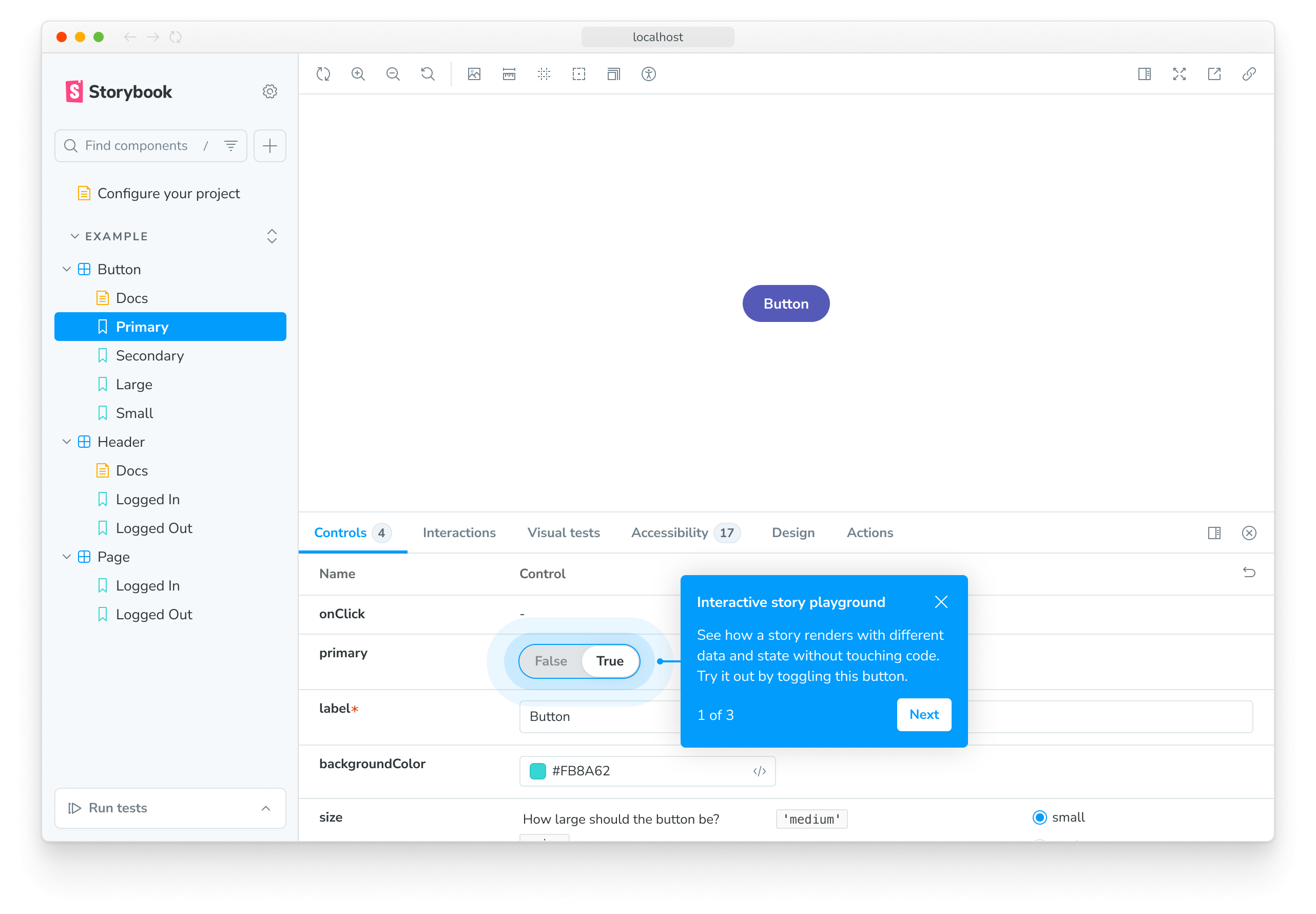
如果您跳过了向导,可以通过在 Storybook 实例的 URL 中添加 ?path=/onboarding 查询参数来再次运行它,前提是示例 story 仍然可用。
Next.js 的 Image 组件
此框架允许您使用 Next.js 的 next/image,无需任何配置。
本地图片
支持本地图片。
import Image from 'next/image';
import profilePic from '../public/me.png';

function Home() {
  return (
    <>
      <h1>My Homepage</h1>
      <Image
        src={profilePic}
        alt="Picture of the author"
        // width={500} automatically provided
        // height={500} automatically provided
        // blurDataURL="../public/me.png" set to equal the image itself (for this framework)
        // placeholder="blur" // Optional blur-up while loading
      />
      <p>Welcome to my homepage!</p>
    </>
  );
}
远程图片
也支持远程图片。
import Image from 'next/image';

export default function Home() {
  return (
    <>
      <h1>My Homepage</h1>
      <Image src="/me.png" alt="Picture of the author" width={500} height={500} />
      <p>Welcome to my homepage!</p>
    </>
  );
}
Next.js 字体优化
next/font 在 Storybook 中得到部分支持。支持 next/font/google 和 next/font/local 包。
next/font/google
您无需做任何事。next/font/google 支持开箱即用。
next/font/local
对于本地字体,您必须定义 src 属性。路径相对于调用字体加载器函数的目录。
如果下面的组件像这样定义了您的 localFont
import localFont from 'next/font/local';

const localRubikStorm = localFont({ src: './fonts/RubikStorm-Regular.ttf' });
staticDir 映射
如果您使用 @storybook/nextjs-vite 而不是 @storybook/nextjs,您可以安全地跳过此部分。基于 Vite 的框架会自动处理映射。
您必须通过 staticDirs 配置告知 Storybook fonts 目录的位置。from 值相对于 .storybook 目录。 to 值相对于 Storybook 的执行上下文。很可能是您项目的根目录。
// Replace your-framework with nextjs or nextjs-vite
import type { StorybookConfig } from '@storybook/your-framework';

const config: StorybookConfig = {
  // ...
  staticDirs: [
    {
      from: '../src/components/fonts',
      to: 'src/components/fonts',
    },
  ],
};

export default config;
next/font 不支持的功能
以下功能尚不支持(可能计划将来支持这些功能)
- 支持 next.config.js 中的字体加载器配置
- fallback 选项
- adjustFontFallback 选项
- preload 选项被忽略。Storybook 以自己的方式处理字体加载。
- display 选项被忽略。所有字体都以 display="block" 加载,以使 Storybook 正确加载字体。
测试时模拟字体
从 Google 获取字体的请求有时可能会在 Storybook 的构建步骤中失败。强烈建议模拟这些请求,因为这些失败也可能导致管道失败。Next.js 支持通过 JavaScript 模块模拟字体,该模块位于 NEXT_FONT_GOOGLE_MOCKED_RESPONSES 环境变量引用的位置。
例如,使用 GitHub Actions
- uses: chromaui/action@latest
  env:
    #👇 the location of mocked fonts to use
    NEXT_FONT_GOOGLE_MOCKED_RESPONSES: ${{ github.workspace }}/mocked-google-fonts.js
  with:
    projectToken: ${{ secrets.CHROMATIC_PROJECT_TOKEN }}
    token: ${{ secrets.GITHUB_TOKEN }}
您的模拟字体将如下所示
//👇 Mocked responses of google fonts with the URL as the key
module.exports = {
  'https://fonts.googleapis.ac.cn/css?family=Inter:wght@400;500;600;800&display=block': `
    /* cyrillic-ext */
    @font-face {
      font-family: 'Inter';
      font-style: normal;
      font-weight: 400;
      font-display: block;
      src: url(https://fonts.gstatic.com/s/inter/v12/UcCO3FwrK3iLTeHuS_fvQtMwCp50KnMw2boKoduKmMEVuLyfAZJhiJ-Ek-_EeAmM.woff2) format('woff2');
      unicode-range: U+0460-052F, U+1C80-1C88, U+20B4, U+2DE0-2DFF, U+A640-A69F, U+FE2E-FE2F;
    }
    /* more font declarations go here */
    /* latin */
    @font-face {
      font-family: 'Inter';
      font-style: normal;
      font-weight: 400;
      font-display: block;
      src: url(https://fonts.gstatic.com/s/inter/v12/UcCO3FwrK3iLTeHuS_fvQtMwCp50KnMw2boKoduKmMEVuLyfAZ9hiJ-Ek-_EeA.woff2) format('woff2');
      unicode-range: U+0000-00FF, U+0131, U+0152-0153, U+02BB-02BC, U+02C6, U+02DA, U+02DC, U+0304, U+0308, U+0329, U+2000-206F, U+2074, U+20AC, U+2122, U+2191, U+2193, U+2212, U+2215, U+FEFF, U+FFFD;
    }`,
};
Next.js 路由
Next.js 的路由器 会被自动存根,因此当与路由器交互时,其所有交互都会自动记录到 Actions 面板。
您应该只在 pages 目录中使用 next/router。在 app 目录中,必须使用 next/navigation。
覆盖默认值
可以通过在故事的 parameters 上添加 nextjs.router 属性来实现每个故事的覆盖。框架会将您在此处放入的任何内容浅合并到路由器中。
// Replace your-framework with nextjs or nextjs-vite
import type { Meta, StoryObj } from '@storybook/your-framework';

import RouterBasedComponent from './RouterBasedComponent';

const meta = {
  component: RouterBasedComponent,
} satisfies Meta<typeof RouterBasedComponent>;

export default meta;
type Story = StoryObj<typeof meta>;

// Interact with the links to see the route change events in the Actions panel.
export const Example: Story = {
  parameters: {
    nextjs: {
      router: {
        pathname: '/profile/[id]',
        asPath: '/profile/1',
        query: {
          id: '1',
        },
      },
    },
  },
};默认路由器
存根路由器上的默认值如下(有关全局变量如何工作的更多详细信息,请参阅 globals)。
// Default router
const defaultRouter = {
  // The locale should be configured globally: https://storybook.org.cn/docs/essentials/toolbars-and-globals#globals
  locale: globals?.locale,
  asPath: '/',
  basePath: '/',
  isFallback: false,
  isLocaleDomain: false,
  isReady: true,
  isPreview: false,
  route: '/',
  pathname: '/',
  query: {},
};此外,router 对象 包含所有原始方法(如 push()、replace() 等)作为模拟函数,可以使用 常规模拟 API 进行操作和断言。
要覆盖这些默认值,您可以使用 parameters 和 beforeEach
// Replace your-framework with nextjs or nextjs-vite
import type { Preview } from '@storybook/your-framework';

// 👇 Must include the `.mock` portion of filename to have mocks typed correctly
import { getRouter } from "@storybook/your-framework/router.mock";

const preview: Preview = {
  parameters: {
    nextjs: {
      // 👇 Override the default router properties
      router: {
        basePath: '/app/',
      },
    },
  },
  async beforeEach() {
    // 👇 Manipulate the default router method mocks
    getRouter().push.mockImplementation(() => {
      /* ... */
    });
  },
};
Next.js 导航
请注意,next/navigation 只能在 app 目录中的组件/页面中使用。
将 nextjs.appDirectory 设置为 true
如果您的故事导入了使用 next/navigation 的组件,则需要将 nextjs.appDirectory 参数设置为 true,以用于该组件的故事
// Replace your-framework with nextjs or nextjs-vite
import type { Meta, StoryObj } from '@storybook/your-framework';

import NavigationBasedComponent from './NavigationBasedComponent';

const meta = {
  component: NavigationBasedComponent,
  parameters: {
    nextjs: {
      appDirectory: true, // 👈 Set this
    },
  },
} satisfies Meta<typeof NavigationBasedComponent>;
export default meta;
如果您的 Next.js 项目为每个页面都使用了 app 目录(换句话说,它没有 pages 目录),您可以在 .storybook/preview.js|ts 文件中将 nextjs.appDirectory 参数设置为 true,以将其应用于所有故事。
// Replace your-framework with nextjs or nextjs-vite
import type { Preview } from '@storybook/your-framework';

const preview: Preview = {
  // ...
  parameters: {
    // ...
    nextjs: {
      appDirectory: true,
    },
  },
};

export default preview;
覆盖默认值
可以通过在故事的 parameters 上添加 nextjs.navigation 属性来为每个故事进行覆盖。框架会将您在此处放入的任何内容浅合并到路由器中。
// Replace your-framework with nextjs or nextjs-vite
import type { Meta, StoryObj } from '@storybook/your-framework';

import NavigationBasedComponent from './NavigationBasedComponent';

const meta = {
  component: NavigationBasedComponent,
  parameters: {
    nextjs: {
      appDirectory: true,
    },
  },
} satisfies Meta<typeof NavigationBasedComponent>;
export default meta;

type Story = StoryObj<typeof meta>;

// Interact with the links to see the route change events in the Actions panel.
export const Example: Story = {
  parameters: {
    nextjs: {
      navigation: {
        pathname: '/profile',
        query: {
          user: '1',
        },
      },
    },
  },
};useSelectedLayoutSegment、useSelectedLayoutSegments 和 useParams hooks
Storybook 支持 useSelectedLayoutSegment、useSelectedLayoutSegments 和 useParams hooks。您必须设置 nextjs.navigation.segments 参数来返回您想要使用的 segments 或 params。
// Replace your-framework with nextjs or nextjs-vite
import type { Meta, StoryObj } from '@storybook/your-framework';

import NavigationBasedComponent from './NavigationBasedComponent';

const meta = {
  component: NavigationBasedComponent,
  parameters: {
    nextjs: {
      appDirectory: true,
      navigation: {
        segments: ['dashboard', 'analytics'],
      },
    },
  },
} satisfies Meta<typeof NavigationBasedComponent>;
export default meta;
使用上面的配置,在故事中渲染的组件将从 hooks 接收以下值
import { useSelectedLayoutSegment, useSelectedLayoutSegments, useParams } from 'next/navigation';

export default function NavigationBasedComponent() {
  const segment = useSelectedLayoutSegment(); // dashboard
  const segments = useSelectedLayoutSegments(); // ["dashboard", "analytics"]
  const params = useParams(); // {}
  // ...
}
要使用 useParams,您必须使用一个 segments 数组,其中每个元素都是一个包含两个字符串的数组。第一个字符串是 param 键,第二个字符串是 param 值。
// Replace your-framework with nextjs or nextjs-vite
import type { Meta, StoryObj } from '@storybook/your-framework';

import NavigationBasedComponent from './NavigationBasedComponent';

const meta = {
  component: NavigationBasedComponent,
  parameters: {
    nextjs: {
      appDirectory: true,
      navigation: {
        segments: [
          ['slug', 'hello'],
          ['framework', 'nextjs'],
        ],
      },
    },
  },
} satisfies Meta<typeof NavigationBasedComponent>;
export default meta;
使用上面的配置,在故事中渲染的组件将从 hooks 接收以下值
import { useSelectedLayoutSegment, useSelectedLayoutSegments, useParams } from 'next/navigation';

export default function ParamsBasedComponent() {
  const segment = useSelectedLayoutSegment(); // hello
  const segments = useSelectedLayoutSegments(); // ["hello", "nextjs"]
  const params = useParams(); // { slug: "hello", framework: "nextjs" }
  ...
}如果未设置 nextjs.navigation.segments,则其默认值为 []。
默认导航上下文
存根导航上下文上的默认值如下
// Default navigation context
const defaultNavigationContext = {
  pathname: '/',
  query: {},
};此外,router 对象 包含所有原始方法(如 push()、replace() 等)作为模拟函数,可以使用 常规模拟 API 进行操作和断言。
要覆盖这些默认值,您可以使用 parameters 和 beforeEach
// Replace your-framework with nextjs or nextjs-vite
import type { Preview } from '@storybook/your-framework';

// 👇 Must include the `.mock` portion of filename to have mocks typed correctly
import { getRouter } from '@storybook/your-framework/navigation.mock';

const preview: Preview = {
  parameters: {
    nextjs: {
      // 👇 Override the default navigation properties
      navigation: {
        pathname: '/app/',
      },
    },
  },
  async beforeEach() {
    // 👇 Manipulate the default navigation method mocks
    getRouter().push.mockImplementation(() => {
      /* ... */
    });
  },
};
Next.js Head
next/head 支持开箱即用。您可以在故事中使用它,就像在 Next.js 应用程序中使用一样。请记住,Head 的 children 会被放置在 Storybook 用于渲染您的故事的 iframe 的 head 元素中。
Sass/Scss
全局 Sass/Scss 样式表 也无需额外配置即可支持。只需将其导入到 .storybook/preview.js|ts 中即可。
import '../styles/globals.scss';这将自动包含您在 next.config.js 文件中的所有 自定义 Sass 配置。
import * as path from 'path';

export default {
  // Any options here are included in Sass compilation for your stories
  sassOptions: {
    includePaths: [path.join(process.cwd(), 'styles')],
  },
};
CSS/Sass/Scss 模块
CSS 模块按预期工作。
// This import will work in Storybook
import styles from './Button.module.css';
// Sass/Scss is also supported
// import styles from './Button.module.scss'
// import styles from './Button.module.sass'

export function Button() {
  return (
    <button type="button" className={styles.error}>
      Destroy
    </button>
  );
}
Styled JSX
Next.js 的内置 CSS-in-JS 解决方案是 styled-jsx,此框架也开箱即用支持它,零配置。
// This will work in Storybook
function HelloWorld() {
  return (
    <div>
      Hello world
      <p>scoped!</p>
      <style jsx>{`
        p {
          color: blue;
        }
        div {
          background: red;
        }
        @media (max-width: 600px) {
          div {
            background: blue;
          }
        }
      `}</style>
      <style global jsx>{`
        body {
          background: black;
        }
      `}</style>
    </div>
  );
}

export default HelloWorld;
您也可以使用自己的 babel 配置。这是一个关于如何自定义 styled-jsx 的示例。
// .babelrc (or whatever config file you use)
{
  "presets": [
    [
      "next/babel",
      {
        "styled-jsx": {
          "plugins": ["@styled-jsx/plugin-sass"]
        }
      }
    ]
  ]
}
PostCSS
Next.js 允许您 自定义 PostCSS 配置。因此,此框架将自动为您处理 PostCSS 配置。
这使得像零配置 Tailwind 这样的酷炫功能成为可能!(请参阅 Next.js 的示例)
绝对导入
支持从根目录进行绝对导入。
// All good!
import Button from 'components/button';
// Also good!
import styles from 'styles/HomePage.module.css';

export default function HomePage() {
  return (
    <>
      <h1 className={styles.title}>Hello World</h1>
      <Button />
    </>
  );
}
在 .storybook/preview.js|ts 中进行全局样式导入也是可以的!
import 'styles/globals.scss';

// ...绝对导入无法在 stories/tests 中模拟。有关更多信息,请参阅 模拟模块 部分。
模块别名
也支持模块别名。
// All good!
import Button from '@/components/button';
// Also good!
import styles from '@/styles/HomePage.module.css';

export default function HomePage() {
  return (
    <>
      <h1 className={styles.title}>Hello World</h1>
      <Button />
    </>
  );
}
子路径导入
作为 模块别名 的替代方案,您可以使用 子路径导入 来导入模块。这遵循 Node 包标准,并在 模拟模块 时具有优势。
要配置子路径导入,请在项目 package.json 文件中定义 imports 属性。此属性将子路径映射到实际文件路径。下面的示例配置了项目中所有模块的子路径导入
{
  "imports": {
    "#*": ["./*", "./*.ts", "./*.tsx"]
  }
}由于子路径导入会替换模块别名,因此您可以从 TypeScript 配置中删除路径别名。
然后可以这样使用
import Button from '#components/button';
import styles from '#styles/HomePage.module.css';

export default function HomePage() {
  return (
    <>
      <h1 className={styles.title}>Hello World</h1>
      <Button />
    </>
  );
}
模拟模块
组件通常依赖于导入到组件文件中的模块。这些模块可以来自外部包,也可以是您项目内部的。在 Storybook 中渲染这些组件或测试它们时,您可能希望 模拟这些模块 来控制和断言它们的行为。
内置模拟模块
此框架为许多 Next.js 内部模块提供了模拟
@storybook/nextjs/cache.mock@storybook/nextjs/headers.mock@storybook/nextjs/navigation.mock@storybook/nextjs/router.mock
模拟其他模块
要模拟其他模块,请使用 automocking 或模拟模块指南中记录的 替代方法 之一。
运行时配置
Next.js 允许 运行时配置,这让您可以导入一个方便的 getConfig 函数,以便在运行时获取 next.config.js 文件中定义的某些配置。
在 Storybook 和此框架的上下文中,您可以预期 Next.js 的 运行时配置 功能可以正常工作。
注意,因为 Storybook 不对组件进行服务器端渲染,所以您的组件只能看到它们在客户端通常看到的内容(即,它们看不到 serverRuntimeConfig,但会看到 publicRuntimeConfig)。
例如,考虑以下 Next.js 配置
module.exports = {
  serverRuntimeConfig: {
    mySecret: 'secret',
    secondSecret: process.env.SECOND_SECRET, // Pass through env variables
  },
  publicRuntimeConfig: {
    staticFolder: '/static',
  },
};
在 Storybook 中调用 getConfig 会返回以下对象
// Runtime config
{
  "serverRuntimeConfig": {},
  "publicRuntimeConfig": {
    "staticFolder": "/static"
  }
}
自定义 Webpack 配置
如果您使用 @storybook/nextjs-vite 而不是 @storybook/nextjs,则可以安全地跳过此部分。基于 Vite 的 Next.js 框架不支持 Webpack 设置。
Next.js 开箱即用提供了许多功能,如 Sass 支持,但有时您会在 Next.js 中添加 自定义 Webpack 配置修改。此框架处理了您想要添加的大部分 Webpack 修改。如果 Next.js 开箱即用支持某个功能,那么该功能在 Storybook 中也将开箱即用。如果 Next.js 不支持某个功能,但易于配置,那么此框架也会为 Storybook 做同样的事情。
任何为 Storybook 所需的 Webpack 修改都应在 .storybook/main.js|ts 中进行。
注意:并非所有 Webpack 修改都可以直接在 next.config.js 和 .storybook/main.js|ts 之间复制粘贴。建议您研究如何正确地将修改应用到 Storybook 的 Webpack 配置以及 Webpack 的工作原理。
下面是一个关于如何在此框架中向 Storybook 添加 SVGR 支持的示例。
import type { StorybookConfig } from '@storybook/nextjs';

const config: StorybookConfig = {
  // ...
  webpackFinal: async (config) => {
    config.module = config.module || {};
    config.module.rules = config.module.rules || [];

    // This modifies the existing image rule to exclude .svg files
    // since you want to handle those files with @svgr/webpack
    const imageRule = config.module.rules.find((rule) => rule?.['test']?.test('.svg'));
    if (imageRule) {
      imageRule['exclude'] = /\.svg$/;
    }

    // Configure .svg files to be loaded with @svgr/webpack
    config.module.rules.push({
      test: /\.svg$/,
      use: ['@svgr/webpack'],
    });

    return config;
  },
};

export default config;
Typescript
Storybook 处理大多数 Typescript 配置,但此框架增加了对 Next.js 支持 绝对导入和模块路径别名 的额外支持。简而言之,它会考虑您 tsconfig.json 的 baseUrl 和 paths。因此,像下面这样的 tsconfig.json 文件将开箱即用。
{
  "compilerOptions": {
    "baseUrl": ".",
    "paths": {
      "@/components/*": ["components/*"]
    }
  }
}
React 服务器组件 (RSC)
(⚠️ 实验性)
如果您的应用程序使用 React 服务器组件 (RSC),Storybook 可以在故事中在浏览器中渲染它们。
要启用此功能,请在您的 .storybook/main.js|ts 配置中设置 experimentalRSC 功能标志
// Replace your-framework with nextjs or nextjs-vite
import type { StorybookConfig } from '@storybook/your-framework';

const config: StorybookConfig = {
  // ...
  features: {
    experimentalRSC: true,
  },
};

export default config;
设置此标志会自动将您的故事包装在 Suspense 包装器中,该包装器能够渲染 NextJS 版本的 React 中的异步组件。
如果此包装器导致您现有故事的任何问题,您可以使用全局/组件/故事级别的 react.rsc 参数 选择性地禁用它
// Replace your-framework with nextjs or nextjs-vite
import type { Meta, StoryObj } from '@storybook/your-framework';

import MyServerComponent from './MyServerComponent';

const meta = {
  component: MyServerComponent,
  parameters: {
    react: { rsc: false },
  },
} satisfies Meta<typeof MyServerComponent>;
export default meta;
请注意,用 Suspense 包装您的服务器组件并不能帮助您的服务器组件访问文件系统或 Node 特定库等服务器端资源。要解决此问题,您需要使用 Webpack 别名 或像 storybook-addon-module-mock 这样的插件来模拟您的数据访问层。
如果您的服务器组件通过网络访问数据,我们建议使用 MSW Storybook Addon 来模拟网络请求。
未来,我们将提供更好的 Storybook 模拟支持和对 Server Actions 的支持。
Yarn v2 和 v3 用户注意事项
如果您正在使用 Yarn v2 或 v3,您可能会遇到 Storybook 无法解析 style-loader 或 css-loader 的问题。例如,您可能会收到类似以下的错误
Module not found: Error: Can't resolve 'css-loader'
Module not found: Error: Can't resolve 'style-loader'
这是因为这些版本的 Yarn 具有与 Yarn v1.x 不同的包解析规则。如果您的项目出现这种情况,请直接安装该包。
常见问题解答
获取数据的页面/组件的故事
Next.js 页面可以直接在 app 目录中的服务器组件中获取数据,这些组件通常包含仅在 node 环境中运行的模块导入。这(目前)在 Storybook 中不起作用,因为如果您在故事中导入包含这些 node 模块导入的 Next.js 页面文件,您的 Storybook 的 Webpack 将会崩溃,因为这些模块将在浏览器中运行。为了解决这个问题,您可以将页面文件中的组件提取到一个单独的文件中,并在您的故事中导入该纯组件。或者,如果由于某种原因不可行,您可以 为您的 Storybook 的 webpackFinal 配置 polyfill 这些模块。
之前
async function getData() {
  const res = await fetch(...);
  // ...
}

// Using this component in your stories will break the Storybook build
export default async function Page() {
  const data = await getData();

  return // ...
}
之后
// Use this component in your stories
import MyPage from './components/MyPage';

async function getData() {
  const res = await fetch(...);
  // ...
}

export default async function Page() {
  const data = await getData();

  return <MyPage {...data} />;
}
静态导入的图片将无法加载
确保您以与在正常开发中使用 next/image 相同的方式处理图像导入。
在使用此框架之前,图像导入会导入图像的原始路径(例如,'static/media/stories/assets/logo.svg')。现在,图像导入的 方式与 Next.js 一致,这意味着您现在在导入图像时会得到一个对象。例如
// Image import object
{
  "src": "static/media/stories/assets/logo.svg",
  "height": 48,
  "width": 48,
  "blurDataURL": "static/media/stories/assets/logo.svg"
}
因此,如果 Storybook 中的某些内容无法正确显示图像,请确保您期望从导入中返回的是一个对象,而不是仅资产路径。
有关 Next.js 如何处理静态图像导入的更多详细信息,请参阅 本地图片。
找不到模块:错误:无法解析 package name
如果您使用 Yarn v2 或 v3,可能会遇到此问题。有关更多详细信息,请参阅 Yarn v2 和 v3 用户注意事项。
您在使用 Vite 构建器吗?
Storybook 提供了一个基于 Vite 的 Next.js 框架。请遵循 安装说明,并将所有 @storybook/nextjs 的实例替换为 @storybook/nextjs-vite。
错误:您正在导入 avif 图片,但您没有安装 sharp。您必须安装 sharp 才能使用 Next.js 中的图片优化功能。
sharp 是 Next.js 图片优化功能的依赖项。如果您看到此错误,则需要在项目中安装 sharp。
npm install sharpyarn add sharppnpm add sharp有关更多信息,您可以参考 Next.js 文档中的 安装 sharp 以使用内置图片优化。
API
模块
@storybook/nextjs 包导出 几个模块,使您能够 模拟 Next.js 的内部行为。
@storybook/nextjs/export-mocks
类型: { getPackageAliases: ({ useESM?: boolean }) => void }
getPackageAliases 是一个用于生成设置 portable stories 所需的别名的助手。
import type { Config } from 'jest';
import nextJest from 'next/jest.js';
// 👇 Import the utility function
import { getPackageAliases } from '@storybook/nextjs/export-mocks';

const createJestConfig = nextJest({
  // Provide the path to your Next.js app to load next.config.js and .env files in your test environment
  dir: './',
});

const config: Config = {
  testEnvironment: 'jsdom',
  // ... rest of Jest config
  moduleNameMapper: {
    ...getPackageAliases(), // 👈 Add the utility as mapped module names
  },
};

export default createJestConfig(config);
@storybook/nextjs/cache.mock
类型: typeof import('next/cache')
此模块导出 next/cache 模块导出的模拟实现。您可以使用它来创建自己的模拟实现或在故事的 play function 中断言模拟调用。
// Replace your-framework with nextjs or nextjs-vite
import type { Meta, StoryObj } from '@storybook/your-framework';

import { expect } from 'storybook/test';

// 👇 Must include the `.mock` portion of filename to have mocks typed correctly
import { revalidatePath } from '@storybook/your-framework/cache.mock';

import MyForm from './my-form';

const meta = {
  component: MyForm,
} satisfies Meta<typeof MyForm>;

export default meta;
type Story = StoryObj<typeof meta>;

export const Submitted: Story = {
  async play({ canvas, userEvent }) {
    const submitButton = canvas.getByRole('button', { name: /submit/i });
    await userEvent.click(saveButton);
    // 👇 Use any mock assertions on the function
    await expect(revalidatePath).toHaveBeenCalledWith('/');
  },
};
@storybook/nextjs/headers.mock
类型: cookies、headers 和 Next.js 的 draftMode
此模块导出 next/headers 模块导出的可写模拟实现。您可以使用它来设置故事中读取的 cookie 或 header,并稍后断言它们已被调用。
Next.js 的默认 headers() 导出是只读的,但此模块公开了允许您写入 header 的方法
headers().append(name: string, value: string):如果 header 已存在,则将其值附加到 header。headers().delete(name: string):删除 headerheaders().set(name: string, value: string):将 header 设置为提供的值。
对于 cookie,您可以使用现有 API 来写入它们。例如,cookies().set('firstName', 'Jane')。
因为 headers()、cookies() 及其子函数都是模拟的,所以您可以在故事中使用任何 模拟工具,例如 headers().getAll.mock.calls。
// Replace your-framework with nextjs or nextjs-vite
import type { Meta, StoryObj } from '@storybook/your-framework';

import { expect } from 'storybook/test';

// 👇 Must include the `.mock` portion of filename to have mocks typed correctly
import { cookies, headers } from '@storybook/your-framework/headers.mock';

import MyForm from './my-form';

const meta = {
  component: MyForm,
} satisfies Meta<typeof MyForm>;

export default meta;
type Story = StoryObj<typeof meta>;

export const LoggedInEurope: Story = {
  async beforeEach() {
    // 👇 Set mock cookies and headers ahead of rendering
    cookies().set('username', 'Sol');
    headers().set('timezone', 'Central European Summer Time');
  },
  async play() {
    // 👇 Assert that your component called the mocks
    await expect(cookies().get).toHaveBeenCalledOnce();
    await expect(cookies().get).toHaveBeenCalledWith('username');
    await expect(headers().get).toHaveBeenCalledOnce();
    await expect(cookies().get).toHaveBeenCalledWith('timezone');
  },
};
@storybook/nextjs/navigation.mock
类型: typeof import('next/navigation') & getRouter: () => ReturnType<typeof import('next/navigation')['useRouter']>
此模块导出 next/navigation 模块导出的模拟实现。它还导出一个 getRouter 函数,该函数返回 Next.js 的 useRouter 中的 router 对象 的模拟版本,允许操作和断言属性。您可以使用它来模拟实现或在故事的 play function 中断言模拟调用。
// Replace your-framework with nextjs or nextjs-vite
import type { Meta, StoryObj } from '@storybook/your-framework';

import { expect } from 'storybook/test';

// 👇 Must include the `.mock` portion of filename to have mocks typed correctly
import { redirect, getRouter } from '@storybook/your-framework/navigation.mock';

import MyForm from './my-form';

const meta = {
  component: MyForm,
  parameters: {
    nextjs: {
      // 👇 As in the Next.js application, next/navigation only works using App Router
      appDirectory: true,
    },
  },
} satisfies Meta<typeof MyForm>;

export default meta;
type Story = StoryObj<typeof meta>;

export const Unauthenticated: Story = {
  async play() {
    // 👇 Assert that your component called redirect()
    await expect(redirect).toHaveBeenCalledWith('/login', 'replace');
  },
};

export const GoBack: Story = {
  async play({ canvas, userEvent }) {
    const backBtn = await canvas.findByText('Go back');

    await userEvent.click(backBtn);
    // 👇 Assert that your component called back()
    await expect(getRouter().back).toHaveBeenCalled();
  },
};
@storybook/nextjs/router.mock
类型: typeof import('next/router') & getRouter: () => ReturnType<typeof import('next/router')['useRouter']>
此模块导出 next/router 模块导出的模拟实现。它还导出一个 getRouter 函数,该函数返回 Next.js 的 useRouter 中的 router 对象 的模拟版本,允许操作和断言属性。您可以使用它来模拟实现或在故事的 play function 中断言模拟调用。
// Replace your-framework with nextjs or nextjs-vite
import type { Meta, StoryObj } from '@storybook/your-framework';

import { expect } from 'storybook/test';

// 👇 Must include the `.mock` portion of filename to have mocks typed correctly
import { getRouter } from '@storybook/your-framework/router.mock';

import MyForm from './my-form';

const meta = {
  component: MyForm,
} satisfies Meta<typeof MyForm>;

export default meta;
type Story = StoryObj<typeof meta>;

export const GoBack: Story = {
  async play({ canvas, userEvent }) {
    const backBtn = await canvas.findByText('Go back');

    await userEvent.click(backBtn);
    // 👇 Assert that your component called back()
    await expect(getRouter().back).toHaveBeenCalled();
  },
};
选项
如果需要,您可以传递一个选项对象进行其他配置
import * as path from 'path';

// Replace your-framework with nextjs or nextjs-vite
export default {
  // ...
  framework: {
    name: '@storybook/your-framework',
    options: {
      image: {
        loading: 'eager',
      },
      nextConfigPath: path.resolve(process.cwd(), 'next.config.js'),
    },
  },
};
可用选项为
builder
类型:Record<string, any>
为 框架的构建器 配置选项。对于 Next.js,可用选项可以在 Webpack 构建器文档 中找到。
image
类型: object
传递给每个 next/image 实例的 props。有关更多详细信息,请参阅 next/image 文档。
nextConfigPath
类型:string
next.config.js 文件的绝对路径。如果您的 next.config.js 文件不在项目根目录,而是自定义的,则需要此设置。
参数
此框架为 Storybook 贡献了以下 parameters,位于 nextjs 命名空间下
appDirectory
类型:boolean
默认:false
如果您的故事导入了使用 next/navigation 的组件,则需要将 nextjs.appDirectory 参数设置为 true。因为这是一个参数,所以您可以将其应用于 单个故事、组件的所有故事 或 您的 Storybook 中的每个故事。有关更多详细信息,请参阅 Next.js Navigation。
navigation
类型
{
  asPath?: string;
  pathname?: string;
  query?: Record<string, string>;
  segments?: (string | [string, string])[];
}
默认值
{
  segments: [];
}
传递给 next/navigation context 的 router 对象。有关更多详细信息,请参阅 Next.js 的导航文档。
router
类型
{
  asPath?: string;
  pathname?: string;
  query?: Record<string, string>;
}
传递给 next/router context 的 router 对象。有关更多详细信息,请参阅 Next.js 的 router 文档。