
Playwright CT 中的可移植故事
(⚠️ 实验性)
Playwright CT 的可移植故事 API 仍处于实验阶段。Playwright CT 本身也处于实验阶段。在未来的版本中,这两个库都可能发生重大更改。
可移植故事是 Storybook 故事,可以在外部环境中使用,例如 Playwright 组件测试 (CT)。
通常,Storybook 会自动组合故事及其 注释,作为 故事流程 的一部分。当在 Playwright CT 中使用故事时,您可以使用 createTest 函数,该函数扩展了 Playwright 的测试功能,添加了一个自定义的 mount 机制,为您处理故事流程。
要使用 Playwright CT 的可移植故事 API,您的项目必须使用 React 18+。
使用 Next.js? Playwright CT 尚不支持 Next.js 中的可移植故事 API。
createTest
(⚠️ 实验性)
您可以使用 Storybook 特有的 createTest 函数,而不是使用 Playwright 自带的 test 函数,来 扩展 Playwright 的基础 fixture 并重写 mount 函数来加载、渲染和运行故事。此函数仍处于实验阶段,可能会发生更改。
import { createTest } from '@storybook/react/experimental-playwright';
import { test as base } from '@playwright/experimental-ct-react';

// See explanation below for `.portable` stories file
import stories from './Button.stories.portable';

const test = createTest(base);

test('renders primary button', async ({ mount }) => {
  // The mount function will execute all the necessary steps in the story,
  // such as loaders, render, and play function
  await mount(<stories.Primary />);
});

test('renders primary button with overridden props', async ({ mount }) => {
  // You can pass custom props to your component via JSX
  const component = await mount(<stories.Primary label="label from test" />);
  await expect(component).toContainText('label from test');
  await expect(component.getByRole('button')).toHaveClass(/storybook-button--primary/);
});您在 Playwright 测试文件中编写的代码由 Playwright 进行转换和编排,其中一部分代码在 Node.js 中执行,而其他部分在浏览器中执行。
因此,您必须在与您的测试文件分开的文件中组合故事
// Replace your-framework with the framework you are using, e.g. react-vite, nextjs, vue3-vite, etc.
import { composeStories } from '@storybook/your-framework';

import * as stories from './Button.stories';

// This function will be executed in the browser
// and compose all stories, exporting them in a single object
export default composeStories(stories);
然后,您可以在 Playwright 测试文件中导入组合后的故事,如上例所示。
Type
createTest(
  baseTest: PlaywrightFixture
) => PlaywrightFixture
参数
baseTest
(必需)
类型:PlaywrightFixture
要使用的基础测试函数,例如 Playwright 的 test。
Return
类型:PlaywrightFixture
一个具有自定义 mount 机制的 Storybook 特定测试函数。
setProjectAnnotations
此 API 应在测试运行前,在 playwright/index.ts 中调用一次。这将确保在调用 mount 时,项目注释也会被考虑在内。
这些是 setup 文件中需要的配置
- preview 注解:在
.storybook/preview.ts中定义的注解 - addon 注解(可选):由 addons 导出的注解
- beforeAll:在所有测试之前运行的代码(更多信息)
import { test } from '@playwright/experimental-ct-react';
// Replace your-framework with the framework you are using, e.g. react-vite, nextjs, nextjs-vite, etc.
import { setProjectAnnotations } from '@storybook/your-framework';
// 👇 Import the exported annotations, if any, from the addons you're using; otherwise remove this
import * as addonAnnotations from 'my-addon/preview';
import * as previewAnnotations from './.storybook/preview';

const annotations = setProjectAnnotations([previewAnnotations, addonAnnotations]);

// Supports beforeAll hook from Storybook
test.beforeAll(annotations.beforeAll);
有时故事可能需要插件的 decorator 或 loader 才能正确渲染。例如,插件可以应用一个 decorator,该 decorator 将您的故事包装在必要的路由上下文中。在这种情况下,您必须在项目注解中包含该插件的 preview 导出。请参阅上面示例中的 addonAnnotations。
注意:如果插件不自动应用 decorator 或 loader 本身,而是将其导出供您在 .storybook/preview.js|ts 中手动应用(例如,使用来自 @storybook/addon-themes 的 withThemeFromJSXProvider),那么您无需执行任何其他操作。它们已包含在上面示例的 previewAnnotations 中。
Type
(projectAnnotations: ProjectAnnotation | ProjectAnnotation[]) => ProjectAnnotation参数
projectAnnotations
(必需)
Type: ProjectAnnotation | ProjectAnnotation[]
一组项目 注解(在 .storybook/preview.js|ts 中定义的)或一组项目注解的数组,它们将应用于所有组合后的故事。
Annotations
注解是应用于故事的元数据,例如 args、decorators、loaders 和 play functions。它们可以为特定故事、组件的所有故事或项目中的所有故事定义。
Story pipeline
要预览您的故事,Storybook 会运行一个故事流程,包括应用项目注释、加载数据、渲染故事和播放交互。这是一个简化的流程版本
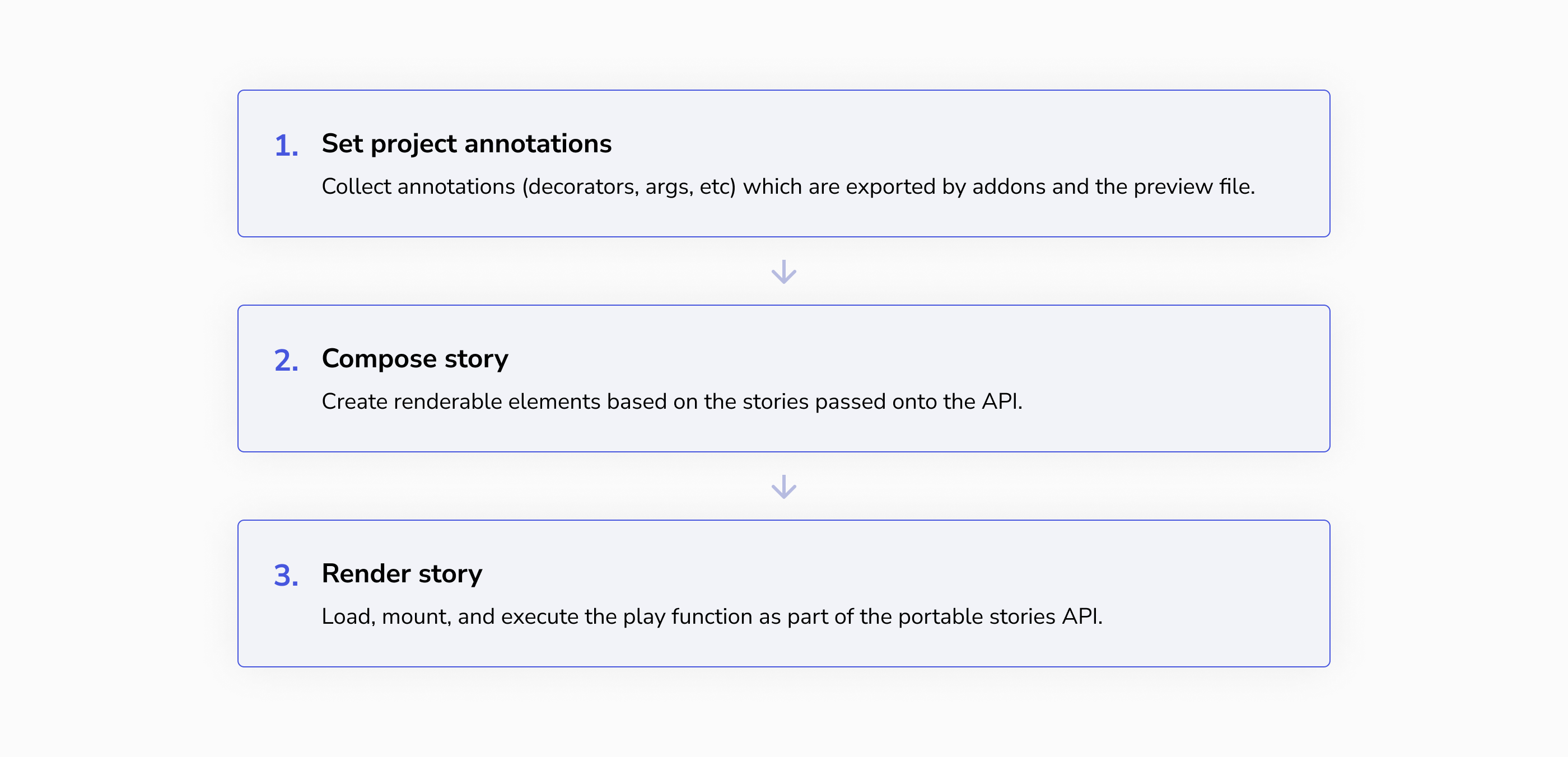
但是,当您想在不同的环境中重用故事时,重要的是要理解所有这些步骤构成了一个故事。可移植故事 API 为您提供了在外部环境中重现该故事流程的机制。
1. 应用项目级注解
Annotations come from the story itself, that story's component, and the project. The project-level annotations are those defined in your .storybook/preview.js file and by addons you're using. In portable stories, these annotations are not applied automatically — you must apply them yourself.
👉 For this, you use the setProjectAnnotations API.
2. 准备、加载、渲染和播放
故事流程包括准备故事、加载数据、渲染故事和播放交互。在 Playwright CT 中的可移植故事中,mount 函数会为您处理这些步骤。
👉 为此,您可以使用 createTest API。
如果您的 play 函数包含断言(例如 expect 调用),您的测试将在这些断言失败时失败。
Overriding globals
如果您的故事行为因 globals(例如,将文本渲染为英语或西班牙语)而异,您可以通过在组合故事时覆盖项目注解来在可移植故事中定义这些全局值。
// Replace your-framework with the framework you are using, e.g. react-vite, nextjs, nextjs-vite, etc.
import { composeStory } from '@storybook/your-framework';

import meta, { Primary } from './Button.stories';

export const PrimaryEnglish = composeStory(
  Primary,
  meta,
  { globals: { locale: 'en' } }, // 👈 Project annotations to override the locale
);

export const PrimarySpanish = composeStory(Primary, meta, { globals: { locale: 'es' } });
然后,您可以在 Playwright 测试文件中使用 createTest 函数来使用这些组合后的故事。